





What Makes the Panasonic Let’s Note FV4 Suitable for Mobile Professionals?
Business users often have to choose between screen space and portability. A compact laptop is easy to carry but may feel restrictive during long work sessions, while a larger device can become burdensome during daily travel. The panasonic let’s note fv4 addresses this problem with a business-focused design that combines a 14-inch display, portable construction, practical connectivity, and hardware suited to professional workloads.
A Larger Display for Serious Work
Screen size has a direct effect on productivity. Professionals frequently work across spreadsheets, reports, email platforms, browser tabs, and communication tools. A small display can make these tasks more tiring because users must repeatedly resize windows or switch between applications.
The Let’s Note FV4 uses a 14-inch QHD display with a 3:2 aspect ratio. Compared with a conventional widescreen format, the taller screen provides more vertical space for documents, websites, and business applications. This can reduce unnecessary scrolling and make it easier to review detailed information.
The format is particularly useful for accountants, project managers, consultants, researchers, and other professionals who spend much of their day reading or editing documents. It also supports side-by-side work when users need to compare files, reference notes, or enter information from one source into another.
Performance for Everyday Business Tasks
A professional laptop must handle common workloads without delays that interrupt concentration. Depending on its configuration, the FV4 may include a 13th-generation Intel Core processor, solid-state storage, and memory suited to business software.
This level of hardware can support tasks such as video meetings, document preparation, spreadsheet analysis, browser-based applications, presentations, and database access. Solid-state storage also helps the computer start quickly and open files without the delays often associated with older mechanical drives.
Buyers should examine the exact configuration before ordering. Processor type, memory capacity, and storage size may vary between units. Someone using cloud applications and office software will have different requirements from an engineer running specialist programs or a professional working with large media files.
Practical Ports Reduce Dependence on Adapters
Many current laptops sacrifice physical connections to achieve a thin profile. That may create difficulties in offices, meeting rooms, training facilities, or field locations where users must connect to existing equipment.
The Let’s Note FV4 is designed with business connectivity in mind. Available connections can include USB ports, video output, Ethernet, an audio connection, and a memory card slot, though the exact selection should be confirmed for the unit under consideration.
Built-in connections can reduce the need to carry several dongles. A consultant may need to connect directly to a conference-room display. An IT technician may require wired Ethernet when diagnosing a network problem. A photographer or inspector may need to transfer files from removable storage. In each case, having the required port on the computer makes the task simpler.
Designed for Frequent Movement
Portability involves more than weight. A mobile business laptop should also be comfortable to carry, easy to open in restricted spaces, and constructed for repeated movement between offices, vehicles, customer locations, and home workspaces.
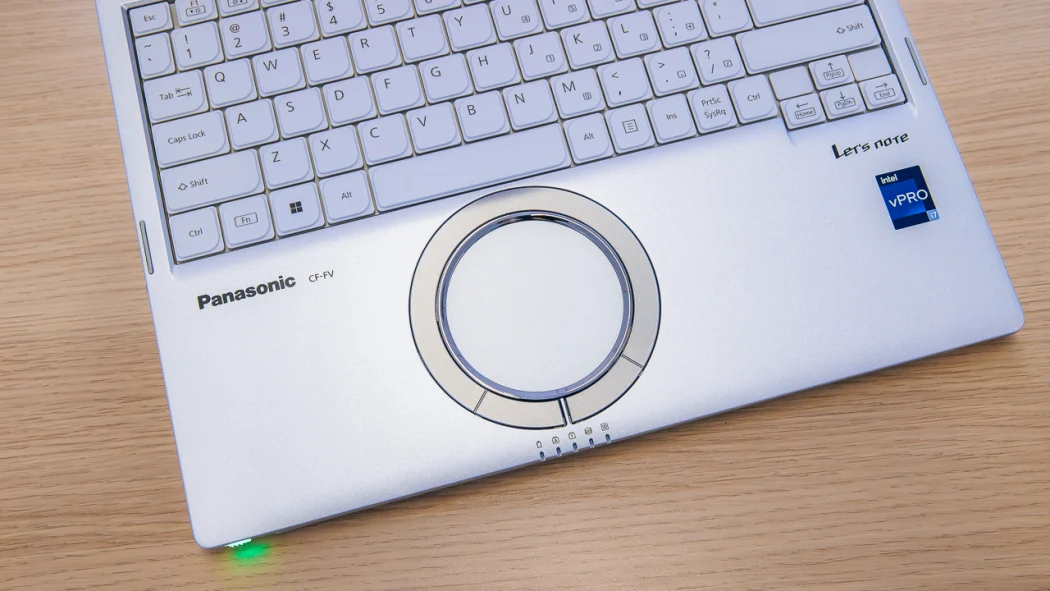
Panasonic’s Let’s Note range is known for placing business mobility at the center of its design. The FV4 offers a large working area in a body intended for regular travel. Its distinctive circular touchpad and practical keyboard layout also separate it from standard consumer notebooks.
It is important, however, to distinguish a business laptop from a fully rugged field computer. The FV4 may be a good match for frequent travel and professional use, but buyers working in heavy rain, extreme dust, or high-impact environments should compare its protection with a fully rugged model.
Battery Life Should Match the Working Day
Battery requirements depend on how the laptop will be used. A professional who moves between powered meeting rooms may have different needs from a field representative who spends most of the day away from an outlet.
Screen brightness, wireless activity, video conferencing, connected devices, and software demands can all affect operating time. Published battery figures are useful for comparison, but they may not reflect every real working condition.
Before purchasing, buyers should confirm the battery’s condition, especially when considering previously owned equipment. They should also check whether replacement batteries and suitable chargers are available. Carrying a compatible spare can be worthwhile for travel or extended field assignments.
Who Should Consider the Let’s Note FV4?
The FV4 can be a strong choice for professionals who want more display space without moving to a bulky workstation laptop. It may suit consultants, sales representatives, managers, educators, inspectors, IT personnel, and remote workers.
Before ordering, confirm the processor, memory, storage, operating system, keyboard layout, battery condition, included charger, and warranty terms. These checks help ensure that the selected unit matches both the software workload and the working environment.
For buyers seeking portable Panasonic business computers and rugged computing equipment, Tough Rugged Laptops provides access to models suited to a range of professional requirements. Visit the website to review the available hardware and choose a laptop that fits your daily work.