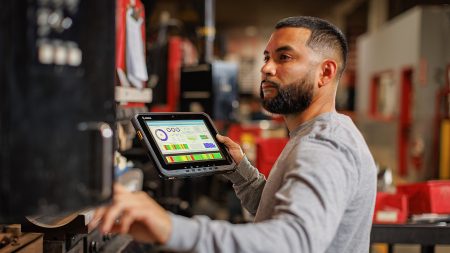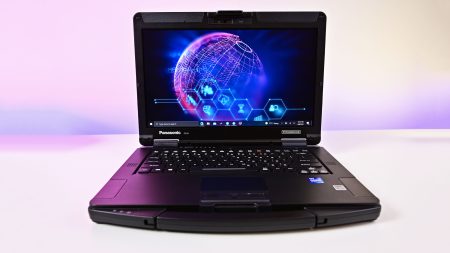





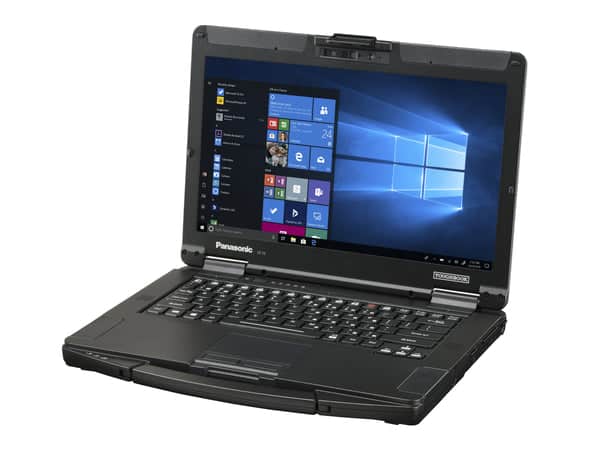
Organizations with mobile employees need computers that can handle travel, changing weather, vehicle vibration, and busy worksites without sacrificing everyday usability. A panasonic toughbook 55 rugged laptop gives field teams a practical balance between physical protection, computing performance, and hardware flexibility. Its semi-rugged design makes it suitable for organizations that need more durability than a consumer laptop can provide but may not require a fully rugged machine.
Designed for Mobile Working Conditions
Office laptops are usually built for controlled indoor environments. Field computers face very different conditions. They may be carried between vehicles and buildings, placed on uneven surfaces, exposed to dust, or used in changing temperatures.
The Toughbook 55 is designed for professionals who need a computer that can tolerate regular transportation and demanding daily use. Its reinforced construction helps protect internal components from the bumps and vibration associated with field operations.
This type of protection can be valuable for utility crews, public safety departments, service technicians, construction supervisors, transportation teams, and warehouse employees. Buyers should review the specifications of their selected configuration to confirm that it matches the conditions employees will encounter.
Modular Hardware for Different Roles
One of the main advantages of the Toughbook 55 is its modular approach. Different employees may use the same core laptop while requiring different ports, storage options, security tools, or other hardware.
Modular expansion areas allow organizations to configure supported components around specific job requirements. A technician may need connections for diagnostic equipment, while a public safety employee may require different wireless or security features.
This approach can also support future changes. Instead of replacing the complete computer when a role requires another connection or capability, an organization may be able to change a supported module. Available modules and compatibility can differ by model generation, so every component should be confirmed before purchase.
Performance That Matches the Workload
Rugged construction is only useful when the computer can run the necessary applications. Organizations should compare processor, memory, storage, and graphics options against their actual software requirements.
Employees who mainly complete reports, access customer records, and use browser-based programs may not need the highest available configuration. Teams using mapping platforms, diagnostic software, large databases, or visual applications may require more processing power and memory.
Storage capacity should also account for offline work. Field employees may need to save maps, manuals, photos, videos, or customer files locally when an internet connection is unavailable. Selecting the right configuration can provide dependable performance without paying for hardware the team will not use.
A Display Suited to Field Use
Screen visibility can affect productivity and safety. Glare and bright sunlight may make a standard laptop difficult to read outdoors, forcing employees to move to another location or increase screen brightness significantly.
Toughbook 55 configurations may offer display features intended to support work in varied lighting conditions. Buyers should compare brightness, resolution, touchscreen support, and anti-reflective properties based on where employees work.
Touch input may help workers complete forms or review diagrams while standing. Teams that wear gloves should confirm whether the chosen screen supports gloved operation. Stylus compatibility may also be useful for signatures, annotations, and detailed inspection work.
Battery Choices for Extended Shifts
Mobile employees cannot always stop to recharge a computer. Actual battery runtime depends on the configuration, display brightness, wireless activity, software, and surrounding temperature.
Organizations should map battery needs to normal shift patterns. Employees who spend most of the day in a vehicle may be able to use a powered dock or charger. Workers stationed away from vehicles and outlets may benefit from an additional battery or a configuration designed for longer runtime.
Replaceable battery options can also extend the useful working period of a computer. IT teams should include chargers, spare batteries, and replacement schedules in the deployment plan rather than treating power as an afterthought.
Ports and Wireless Connections
Field teams often connect laptops to equipment that is rarely used in a traditional office. Diagnostic devices, barcode scanners, printers, cameras, antennas, and measurement tools may require specific physical ports.
Buyers should create a connection checklist before ordering. The checklist may include USB, Ethernet, display output, audio, serial connectivity, Wi-Fi, Bluetooth, cellular service, or GPS.
Confirming these requirements early can reduce the need for loose adapters and external hubs. It also helps the purchasing team select configurations that employees can use immediately after deployment.
Vehicle Docks and Mobile Workstations
The Toughbook 55 can serve as the center of a vehicle-based workstation when paired with a compatible dock and mounting system. This setup can provide power and connections for external displays, keyboards, antennas, or other accessories.
A secure mount can keep the computer stable during travel while allowing employees to remove it when work takes them outside the vehicle. Before selecting a dock, organizations should verify model compatibility, available space, cable placement, and safe positioning inside each vehicle.
Security and Device Management
Field laptops may store customer information, infrastructure records, location data, or internal business files. Physical durability must therefore be supported by proper digital security.
IT departments should review authentication options, storage protection, operating-system compatibility, remote management, and policies for lost or stolen devices. The selected model should work with the organization’s existing security software and account controls.
Consider the Long-Term Cost
The purchase price is only one part of a field computer’s cost. Buyers should also consider expected service life, repairs, employee downtime, accessories, warranties, replacement batteries, and future hardware needs.
A modular semi-rugged laptop may provide strong long-term value when it can be configured for different roles and updated with supported components. Businesses ready to compare Toughbook 55 configurations, expansion choices, docks, and accessories can visit Tough Rugged Laptops and request a system suited to their field requirements.